Click Below images To See Quick Guides for Current FarmVille Quests and Prizes!

FarmVille Hotel Duckula Quests
Hotel Duckula Quests
FarmVille Zoo Scavenging Quests - FvLegends.Com
Zoo Scavenging Quests
FarmVille Canning Extravaganza Quests
Canning Extravaganza Quests
FarmVille 22nd July, 2013, Mystery Game & Raffle Booth - FvLegends
22nd July Mystery Game & Raffle Booth
FarmVille Celestial Pastures Chapter Seventh (7) Quests
Celestial Pastures Chapter Seventh (7) Quests
FarmVille Celestial Pastures Chapter Eighth (8) Quests
Celestial Pastures Chapter Eighth (8) Quests
FarmVille Sweet Acres Chapter 3rd (3) Quests
Sweet Acres Chapter 3rd (3) Quests
Showing posts with label Tutorial. Show all posts

Trick To Play Farmville Express on your Computer Without iPhone, iPad, iPod or Android Phone

Posted by Rahib Aly Sunday, December 2, 2012

Share this post with your Farming friends

FarmVille Legends! Recently we carried out a post on how to use the mobile version of the game, FarmVille Express, to plant certain locked crops which required seeds, and were hard to obtain via regular gameplay. Well, how good would it be if you could simply use Farmville Express on your regular computer, instead of your mobile? Well, there is a simple way to do this, and this is called as User-agent switching, which basically means making the browser believe it is some other platform. Like, making your Chrome believe it is actually running on an Android based smartphone… Sounds too technical? Well, browser plugins have been coming to the rescue in such cases and simplifying things beyond imagination… We are going to discuss one such plugin here…
Farmville Express
Note: There might be other plugins too, but we are only listing the ones that we have tested and found to work successfully for our use… Also, you can use the User-agent setting to check out mobile versions of other site too, like Facebook, and such…


Rahib Aly | 4:13 AM | | | | |

FarmVille Legends Guide: Zynga Player Support How to Connect and get Help!

Posted by Rahib Aly Friday, September 28, 2012

Share this post with your Farming friends

Zynga Thumnail Picture
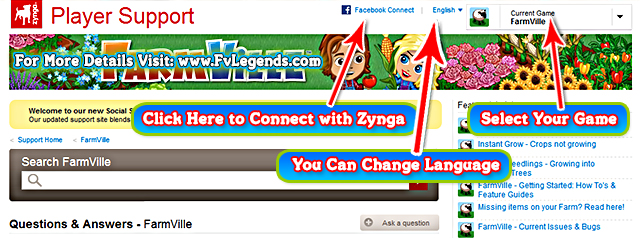
FarmVille Legends! Yesterday Zynga has launched a completely revised customer support site for all its games. This site has new features, as well as the old and new requirements for being able to contact  customer support.  Here we will show you how to navigate and use the new site. Check it out and please share with friends if you find the guide useful.

For the first two weeks that the new site is live, the old site will also be active. You will not however, be able to access live chat or email from the old site, only the new.  Currently, clicking on support under the game still brings you to the old site. 

You can access the new support site directly via this link or click here.

TIP: Select your language first from the Language drop-down list at the top of the page so we talk the same language!
Zynga Player Support Help Chat

Account Registration


Zynga has a brand new Account Registration system. Here's how to get your new account setup.

IMPORTANT: You must set up a new account to interact with Social Support and to submit help requests to Customer Support.
  1. Click Facebook Connect at the top of the page.
  2. Sign in to Facebook and allow the Zynga Player Support application access to your Facebook account. You can adjust Privacy settings in the bottom left corner of the Zynga Player Support dialog box.
  3. Create a nickname for your account. This nickname will appear in your Social Support actions only.
  4. Click Create Account. The system checks to make sure your nickname is unique.
  5. Click refresh in your browser to refresh the page.

That's it! Your new account is created and a simple account profile displays.

Only you can see your account details. You can check your account profile at any time by clicking Account at the top of the page.

Now that you're signed in, let's look around!

Participating in Social Support


You can start by:
  • Searching by a keyword: Results contain hits from both questions and articles from our knowledge base.
  • Selecting your game from one of the large game boxes, or from the list below the large game boxes, or from the drop-down list at the top of the page.
After selecting a game, the Social Support page for your game displays. From here, you can participate in Social Support, or search for content.
Zynga Support Contact Us Options

Source: Zynga News

Did you find this Guide useful ? if Yes then please take 5 seconds to share this post with your friends. And u can also join us on Facebook by liking our Fan Page. Stay Tuned for More.. Happy Farming!


Rahib Aly | 9:53 AM | | | | | |

FarmVille Trick & Tutorial: Re-enable Link Copying using Browser Plugins

Posted by Rahib Aly Wednesday, July 18, 2012

Share this post with your Farming friends

FarmVille Legends Tricks Icon
FarmVille Legends! As you all know that Facebook made some changes to stop us from copying our game requests links / urls. In this post we will tell you a method so you can still copy urls as before. There is a plugin Add-on for you! It’s easy to install and you don’t need to do anything special once it’s enabled. To start using it now, just  follow the instructions below on this page.

1. Click on the link below. (Note: If you are a FireFox user, you will have to have Greasemonkey or something similar activated. Go here to download and install Greasemonkey plugin First.)


copy8
2. Now Click continue in Chrome or Install in FireFox.
copy9
3. wait for confirmation that the Extension or AddOn was installed and you are done.

4. The dotted outline will still appear on your requests but you can now copy them as you did in the past.
Hope this Helps You! Remember to share this Trick Post with your friends.. And join us on Facebook by liking our Fan Page. Happy Farming!


Rahib Aly | 9:00 PM | | | |

FarmVille Ask Link for a Set Of 20 Shovels!

Posted by Rahib Aly Friday, October 21, 2011

Share this post with your Farming friends

Hello Farmers, if you remember our 5months old post about How to Get tons of Shovels !
And with that link you were able to ask for 10 sets of shovel with 1 single link!
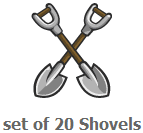
But now you can ask 20 shovel set with this new link of FarmVille Askmat Material by Clicking on Below Image. I'm also writing a trick that can help you to get tons of shovels by asking many times from a Single person or neighbor ;)

This trick will help you accomplish collecting allot of shovels much easier and faster.
You can get unlimited shovels using this cheat.
FarmVille Ask mat Link for 20 Shovel Pack - FvLegends.Com
Click on This Picture to Ask
20 Shovels Pack
  1. Click on the Picture and click single part (Open this link as many times as you want)
  2. Select your neighbor (or Dummy) and Send Request
  3. Accept your shovels and put them in your Cellar
FvLegends.Com
1 Shovel = 20 shovels
So if you are asking 10 people you will get 200 Shovels.


Rahib Aly | 4:59 AM | | | |

FarmVille Tutorial: Share Unreleased Trees without any problem!

Posted by Rahib Aly Thursday, October 20, 2011

Share this post with your Farming friends

FarmVille Giant Sugar Skull Tree - FvLegends.Com
Giant Sugar Skull
(Sample Tree)
Those Trees that are not visible in FarmVille yet, means does not have an image available in the Database. Gives you an error while trying to share or grow on your farm! 
as shown below in the Screenshot.
FarmVille Error Pop up While trying to share Unreleased Tree - FvLegends.Com
FarmVille Error Pop up While trying to share Unreleased Tree
So Many of the Tree Breeders must be getting this error. Am i Right?
But we can fix this error using Charles Web Debugging Proxy Application and following some simple Steps:

  1. Load Farm
  2. Load Charles (Breakpoints off)
  3. Water your seedling completely
  4. When pop up for sharing the Tree Appears, Turn On Breakpoints in Charles
  5. Then click share
  6. Charles will pop-up, Go to Edit Request > AMF > expand params > [1] > images > [0]
  7. in src change Type from Null to string
  8. in value add the image link(url) (i.e http://fvlegends.com/Giant-Sugar-Skull.png)
  9. Turn Off Breakpoints, and execute twice!
FarmVille Charles Pop up, Step 6, 7 & 8 - FvLegends.Com
FarmVille Charles Pop up, Step 6, 7 & 8
That's it, now you will get the Publishing windows with Correct Image!
FarmVille Unreleased Tree Share Pop up - FvLegends.Com
FarmVille Unreleased Tree Share Pop up
This was an example of the Giant Sugar Skull Tree... It's Still Unreleased!

So if any Tree in future get the Same Problem Then we Can Do The Same Steps, But we'll have to do some changes in 8th step of course ;)

How To Get the Links of Unreleased Trees?
  1. Open http://www.fvlegends.com/search?label=Tree
  2. Then Right Click on The Tree's Image u want to Share.
  3. There you will find "Copy Image Location/Url" Click on it.
  4. Then in the 8th step in value add the image link (i.e Tree's URL u just Copied)
That's it. Hope you enjoyed learning this trick leave your comments below.
For more FarmVille Tricks and tutorials visit our Charles Tutorials page.


    Rahib Aly | 1:50 PM | | | |

    How to Earn Farm Cash from Cash Offers and Contacting TrialPay Support

    Posted by Rahib Aly Saturday, October 8, 2011

    Share this post with your Farming friends

    This is for all Zynga Games: Earn Cash Offers and Contacting TrialPay Support
    Zynga has partnered with TrialPay to provide you access to exclusive offers that give you the ability to earn Game Cash for your favorite games.

    FarmVille Farm Cash Icon - FvLegends.Com
    FarmVille
    Farm Cash
    Earning Game Cash through a TrialPay Offer
    To earn Game Cash for a Zynga game:

    1. Click the Earn Cash tab above your game.
    2. Review the offers.
    3. Select and complete an offer.
    4. Look for information from TrialPay in your email inbox.
    Troubleshooting TrialPay Offers
    If you feel that you have completed all of the necessary steps to receive credit for an offer but have not received your Game Cash, follow the steps below to contact the TrialPay support team. The TrialPay team can only assist with requests submitted via this process.

    1. Click the Earn Cash tab in the game you are playing. The offers open in a pop-up window.
    2. Click Help.
    3. Under Check Your Offer Status, click See My Offer Status.
    4. Select the game for which you applied the offer from the Recently Visited Offers drop-down list.
    5. If the current status of the promotion in question is "Visited" and you have completed the promotion, you will need to contact TrialPay for further assistance.
    6. Click Contact Support at the bottom of the pop-up window to contact TrialPay.
    FarmVille Earned Farm Cash From Offer Notice - FvLegends.Com
    FarmVille Earned Farm Cash From Offer Notice


    Rahib Aly | 7:51 PM | | | |

    FarmVille Charles Trick: Unlock Rainbow Chard Crops for Coins! Hurry up Only 2 Days Left!

    Posted by Rahib Aly Sunday, September 4, 2011

    Share this post with your Farming friends

    Here is a quick Charles trick to unlock Rainbow Chard Crops for Coins without purchasing any license!
    This method was shared by Gokul Nair!
    Rainbow Chard unlocked Market
    Requirements:
     This Tutorial is Shared by Fvlegends.blogspot.com
    Steps:
    1. Open Charles (Breakpoints OFF)
    2. Load Farm, Wait until its fully loaded
    3. Back to Charles, set BP-ON
    4. Back to Farm, Open Market
    5. Charles Pop-Up
    6. Go to Edit Request > AMF
    7. Find value UserService.publishUserAction , change it to LicenseService.acquireLicense
    8. Find Value VisitMarket, change it to 0eo
    9. Below visit market, change Object with String Change String Value to L61
    10. Execute twice, Breakpoints off and Refresh your Farm!
    That's it, now you can Plant Rainbow Chard Crops with coins :) 


    Rahib Aly | 1:35 AM | | | | |

    How to: Setup Charles Web Debugging Breakpoints for FarmVille!

    Posted by Rahib Aly Saturday, August 27, 2011

    Share this post with your Farming friends

    Most of the FarmVille Tricks & Cheats works with a Program Called "Charles Web Debugging Proxy"
    I know you have heard this word "Charles" many times on FarmVille Legends site! and we have also a page for Charles Tutorials!
    Now coming to the point, we will give you a short description first on how Charles Program's Breakpoints actually works!
    The Breakpoints tool lets you intercept requests and responses before they are passed through Charles. When a request or response trips a breakpoint the Breakpoints window automatically opens in Charles and comes to the front. At this point you can make changes to the request & response pop up, in that point all the tricks can be applied which are posted in our Charles Tutorials page. After making all the changes you wanted in Charles you can execute the request or response proceed!

    How to Set Breakpoints for FarmVille Game: 
    1. Open Charles Web debugging proxy program (Download)
    2. Open www.Farmville.com & load your farm
    3. Back to Charles look for "http://www.farmville.com" folder.
    4. Click on + sign to Expand the folder
    5. Expand flashservices folder
    6. Inside the flashservices you will find "gateway.php"
    7. Right click on "gateway.php" and click Breakpoints.
    Charles Breakpoints Setup Screen Shot!
    That's it now you have successfully done the breakpoints setting for FarmVille.com

    Note: You Don't have to do this every time, it's just a one-time setup. now you can use "Red" button on Charles to turn your breakpoints ON or OFF.
    For more Tricks & Tutorials Visit. FvMethods.Cu.Cc


    Rahib Aly | 5:38 PM | | |

    Receive all updates via Facebook. Just Click the Like Button Below

    You can also receive Free Email Updates: